
Last updated on
Nov 6, 2026
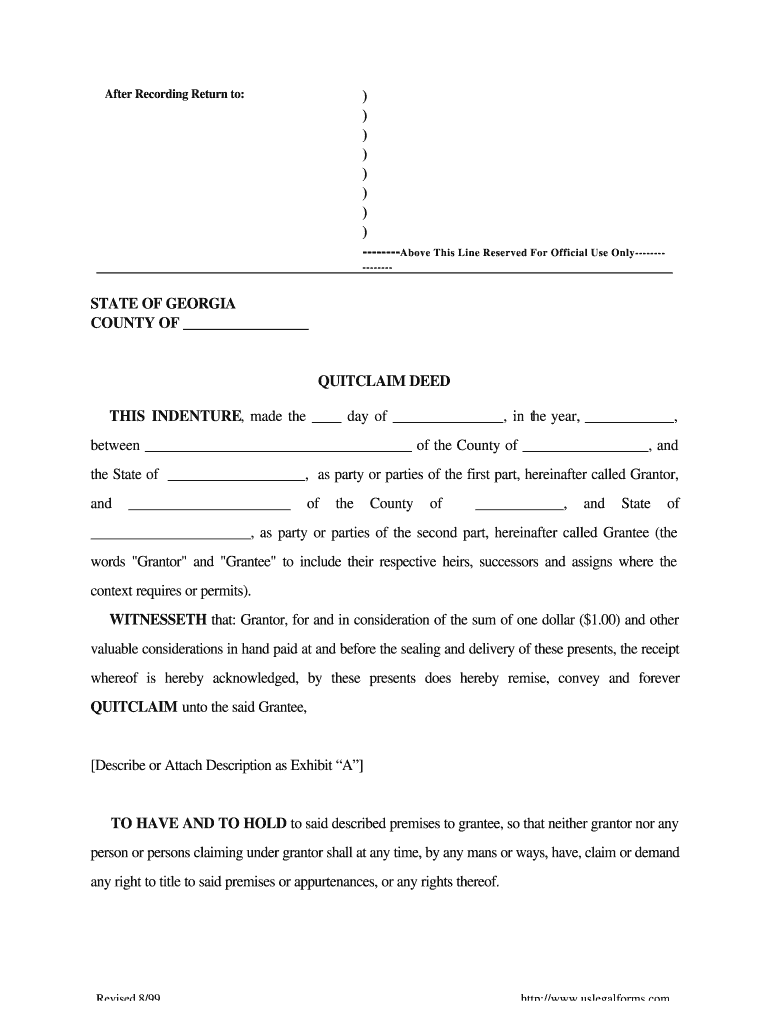
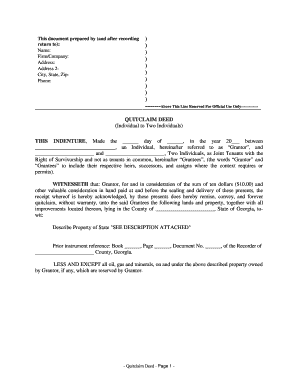
GA Quitclaim Deed 2003 free printable template
pdfFiller is not affiliated with any government organization

Fill out
Complete the form online in a simple drag-and-drop editor.

eSign
Add your legally binding signature or send the form for signing.

Share
Share the form via a link, letting anyone fill it out from any device.

Export
Download, print, email, or move the form to your cloud storage.
Why pdfFiller is the best tool for your documents and forms


End-to-end document management
From editing and signing to collaboration and tracking, pdfFiller has everything you need to get your documents done quickly and efficiently.
Accessible from anywhere
pdfFiller is fully cloud-based. This means you can edit, sign, and share documents from anywhere using your computer, smartphone, or tablet.
Secure and compliant
pdfFiller lets you securely manage documents following global laws like ESIGN, CCPA, and GDPR. It's also HIPAA and SOC 2 compliant.
What is GA Quitclaim Deed
The Georgia Quitclaim Deed is a legal document used by property owners to transfer real estate ownership in the state of Georgia.
pdfFiller scores top ratings on review platforms




It was easy ,and the prints were clear and crisp.
Great service
Great service, had a problem with some money beikg taken from me which shouldn't have been, either it was my fault or theirs idk doesnt matter. What matters i the support was quick to give it back. Such service isnt seen very much around
Who needs GA Quitclaim Deed?
Explore how professionals across industries use pdfFiller.

GA Quitclaim Deed is needed by:
-
Property owners wishing to transfer their property rights
-
Attorneys handling real estate transactions
-
Real estate agents facilitating property sales
-
Accountants advising clients on property transfers
-
Notaries Public verifying signatures for the deed
-
Title companies managing property claims
Comprehensive Guide to GA Quitclaim Deed
What is the Georgia Quitclaim Deed?
The Georgia Quitclaim Deed is a legal document that facilitates the transfer of property ownership in Georgia. This type of deed allows a grantor to transfer their interest in a property to a grantee without guaranteeing the title. It is significant in property transactions as it streamlines the process of ownership transfer, especially between familiar parties.
In Georgia, the quitclaim deed plays a crucial role in legal property ownership transfers. Essential parties involved in this transaction include the grantor, who is transferring their interest, the grantee, who is receiving it, and a notary public, who ensures the authenticity of the signatures. Understanding the roles of these parties is fundamental for anyone involved in property transactions in Georgia.
Purpose and Benefits of the Georgia Quitclaim Deed
The primary purpose of using a quitclaim deed in Georgia is to simplify property transfers between individuals, such as family members, by eliminating complex legal hurdles. This method is particularly advantageous when property ownership disputes arise, as it minimizes potential conflicts.
Utilizing a quitclaim deed is also a cost-effective approach for property transfers. Its straightforward nature means that it can often be executed without extensive legal assistance, making it an appealing option for many property owners.
Key Features of the Georgia Quitclaim Deed
The Georgia Quitclaim Deed form includes various important elements that must be completed accurately. Key fields include the names of the grantor and grantee, the specific property address, and the date of the transfer.
A notary public is essential for executing the document, as their acknowledgment lends legal credibility to the transaction. Additionally, the deed may contain several clauses that outline specific terms related to the transfer, ensuring clarity for all parties involved.
Who Needs the Georgia Quitclaim Deed?
This legal document is particularly useful for individuals who are transferring property ownership. Common scenarios involve divorcing couples needing to clarify ownership or heirs dealing with inherited property. Utilizing a quitclaim deed can address ownership interests modifications effectively.
Real estate forms like the Georgia Quitclaim Deed are vital for anyone engaged in property transactions due to the legal implications tied to ownership changes. Understanding when to use this form can greatly benefit those involved.
How to Fill Out the Georgia Quitclaim Deed Online
Filling out the Georgia Quitclaim Deed online is a straightforward process, especially using platforms like pdfFiller. To begin, follow these steps:
-
Access the quitclaim deed template online through pdfFiller's platform.
-
Edit the necessary fields, including grantor's and grantee's information, property details, and the date.
-
Ensure all entries are accurate before finalizing the document.
While completing the form, take care to follow specific instructions and double-check for completeness to avoid future issues.
Signing and Notarizing the Georgia Quitclaim Deed
The signing and notarization process is crucial for the legal validity of the Georgia Quitclaim Deed. Both digital signatures and wet signatures are acceptable, but the requirements may differ based on the chosen method. Engaging a notary public is essential since they play a pivotal role in verifying the identity of the signers and ensuring the document's legality.
Proper signing and notarization are vital; failure to meet these requirements could jeopardize the validity of the deed.
Submitting the Georgia Quitclaim Deed
After completing the Georgia Quitclaim Deed, the next step is submission. There are several methods for submitting the deed, including:
-
Visiting the county recorder’s office in person.
-
Mailing the completed document.
-
Using online submission options if available.
When filing, ensure you include any required fees and essential information to prevent delays. Tracking the status of the filed deed can also provide peace of mind, confirming that the transfer has been officially processed.
Common Errors and How to Avoid Them
Many users encounter frequent mistakes when completing the quitclaim deed. Common errors include missing signatures and incorrect property details. To avoid such pitfalls, it is essential to follow best practices when reviewing the completed form.
Double-checking all entries and consulting a pre-filing checklist can help ensure that the document is accurate, thus minimizing processing delays that can arise from errors.
Security and Compliance for the Georgia Quitclaim Deed
When handling sensitive information in the quitclaim deed process, security and compliance are paramount. Platforms like pdfFiller employ stringent security measures including encryption to protect user data throughout the editing and filing process.
Understanding the importance of data protection in real estate transactions is crucial for all parties involved. Additionally, being aware of privacy policies and document retention guidelines ensures that sensitive information is managed properly.
Experience Convenient Property Transfers with pdfFiller
pdfFiller enhances the quitclaim deed process by offering an easy-to-use platform for creating, editing, and submitting real estate forms. Its user-friendly features streamline the workflow, ensuring that users can focus on their property transfer needs without unnecessary complications.
The security standards upheld by pdfFiller make it a trustworthy choice for managing important real estate documents, allowing users to securely handle their property transfers with confidence.
How to fill out the GA Quitclaim Deed
-
1.Access pdfFiller and search for 'Georgia Quitclaim Deed' using the search bar to locate the form easily.
-
2.Open the form, and you will see various fields that need to be filled out pertaining to the grantor, grantee, and property details.
-
3.Before starting, gather essential information such as the full names of the grantor and grantee, the property description, and transfer date to ensure a smooth filling process.
-
4.Begin by entering the name of the grantor in the designated field, followed by the name of the grantee to specify the transfer recipient.
-
5.Next, provide a detailed description of the property being transferred. Include location details and any relevant identifiers.
-
6.Fill out the necessary fields indicating the date of transfer and ensure all information is accurate to avoid any issues.
-
7.Once you have completed all sections, review the form for any errors or missing information. Utilize pdfFiller’s built-in features for checking your entries.
-
8.To finalize your document, go to the toolbar and select ’Save’ to keep a copy on pdfFiller or download it in your preferred format.
-
9.If you need to submit the form, choose the ‘Submit’ option through pdfFiller, adhering to any specific procedures required for notarization, if necessary.

What is required to complete the Georgia Quitclaim Deed?
To complete the Georgia Quitclaim Deed, you need the names of both the grantor and grantee, the property description, and the transfer date. Additionally, a notary public must witness the signature of the grantor.
Are there any fees associated with the Georgia Quitclaim Deed?
There may be fees related to notary services and recording the deed with the county. These fees can vary; it's recommended to check with local authorities or service providers for precise costs.
How do I ensure the deed is legally binding?
To ensure the Georgia Quitclaim Deed is legally binding, it must be signed by the grantor in the presence of a notary public. Additionally, it should be recorded with the appropriate county office.
Can the Grantee sign the Quitclaim Deed?
The Grantee does not need to sign the Georgia Quitclaim Deed for it to be valid. However, having the Grantee's acknowledgment can be beneficial for clarity in the transaction.
What common mistakes should I avoid when filling out the Quitclaim Deed?
Avoid leaving any required fields blank, such as names or property descriptions. Also, ensure that the grantor's signature is properly notarized to prevent legal challenges.
How can I use the Quitclaim Deed to transfer property ownership?
To transfer property ownership using a Quitclaim Deed, fill out the form with accurate details about the grantor and grantee, sign in front of a notary, and record the deed with the relevant county office.
What should I do if I made an error after signing?
If you notice an error after signing, you cannot simply correct it. You may need to prepare a new Quitclaim Deed to amend the previous one, ensuring all details are accurate this time.
GA Quitclaim Deed Form Versions
Related Content
Related Forms




Get the latest insights from our blog



If you believe that this page should be taken down, please follow our DMCA take down process
here
.
This form may include fields for payment information. Data entered in these fields is not covered by PCI DSS compliance.